
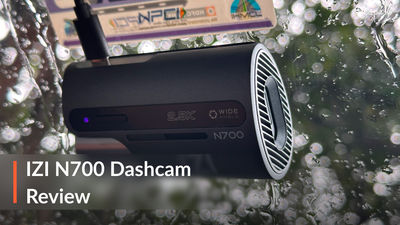
IZI Drive N700 Long-Term Review: Great Footage, But There’s A Catch
The IZI Drive N700 delivers impressive footage, but three months of living tells us more...
Three months on, the IZI Drive N700 has proven to be a genuinely good camera, let down by a few frustrating lapses, most of which only showed up once we had lived with it.
A dashcam is an odd accessory to review. On day one, there is very little to judge. You stick it on, it beeps, a light comes on, and that is that. Its real worth only becomes clear later. You find out when you actually need a clip, try to pull footage onto your phone in a car park, or realise the memory card has been quietly filling up for weeks.
When the N700 joined our long-term garage in June, the brief was simple. Live with it the way an ordinary owner would, in Indian heat, dust and traffic, and see what holds up. Ours went into a 2016 fourth-generation Honda City and covered around 2,500km in three months. Only about 200km of that was city driving; the rest came on runs between Pune and Mumbai, which makes this a highway-heavy test.
Here is what we learnt, in roughly the order a buyer would want to know it.
Video Quality: The Reason You Buy It
Daytime footage is the N700's strongest suit, and it is the main reason to shortlist it. The hardware is sound for the money. It pairs a 5MP Sony STARVIS IMX335 sensor with 2.5K recording at 2560 x 1440 and 30 fps. That is a meaningful step up from the 1080p cameras that still crowd this price bracket.
In practice, the extra resolution matters for one reason: detail you can actually use. A dashcam clip is only valuable if it shows clearly what happened and who was involved. On our Pune–Mumbai runs, daytime footage was consistently sharp and steady, with natural colours and sensible exposure.
Can it read number plates? This is the question every buyer asks, and the honest answer is: it depends on distance and angle. In daylight, plates on the car directly ahead were readable in our footage. Plates on vehicles cutting across from the edges of the frame, or travelling at a very different speed, were far less dependable, as they are with most dashcams at this price.
One thing to know about the 4K claim: IZI's product page mentions 4K capability, but the headline recording specification is 2.5K. We would judge the camera on its 2.5K output, which is what most owners will use.
Reflections did creep into our footage at times. That is not unique to the N700; even a good sensor cannot see through glare. On a bright day, a light-coloured dashboard can reflect onto the inside of the glass and wash out part of the image. Three habits help:
-
Keep the inside of the windscreen clean; haze shows up on camera before you notice it yourself.
-
Mount the camera high and close to the glass, behind the rear-view mirror.
-
Be wary of dashboard covers or objects that throw bright reflections forward.
In our case, reflections were most noticeable in bright daylight, when the dashboard threw its glare onto the glass and washed out part of the frame.
How Good Is It At Night?
Night recording is well equipped for the price, and in our use it turned out to be one of the N700's stronger points. IZI lists infrared night vision and WDR (wide dynamic range). In plain terms, WDR tries to balance the very bright and very dark parts of a scene. That matters in India, where you constantly get blinding headlights next to an unlit road shoulder.
What matters at night is less "does it look nice" and more "would it hold up as evidence". That comes down to three things:
-
Headlight glare: whether oncoming lights flare and swallow the detail around them.
-
Shadow detail: whether pedestrians, two-wheelers without lights and road edges stay visible.
-
Plates under lights: whether the plate ahead stays legible, or turns into a glowing white rectangle.
In our footage, lit city roads came out clear and useful, with oncoming headlights kept reasonably in check.
On darker stretches, the picture was softer and grainier, as you would expect.
As a rule of thumb, expect well-lit urban roads to give you useful night footage. On a pitch-dark highway, any dashcam in this class captures what your headlights reveal and not much more.
Is The 170-Degree View Actually Useful?
Yes, mostly. But a wider view is a trade-off, not simply "more is better".
The upside is context. A 170-degree lens takes in the adjacent lanes, both sides of a junction and the scooter that appears from nowhere on your left. In an incident, knowing what was happening around the car often matters as much as what was directly ahead.
The downside is that the same pixels are spread across a much wider scene. Objects at the edges look stretched and smaller, with the familiar fisheye curve. So a plate at the far edge of the frame carries less detail than one dead ahead, even at 2.5K.
In our footage, the stretching at the edges was visible but never made a clip useless. The extra context was worth more than the detail it cost.
For Indian traffic, where threats come from every direction, we would take the wider view and accept the distortion.
Installation Is Easy, But It Costs You Your 12V Socket
Getting the N700 running is simple enough to do yourself in a weekend morning. The box contains everything you need except the memory card: the camera, windscreen mounting stickers, a power cable, a 12V adapter, installation accessories and a manual. We had ours professionally fitted, mainly for a neater cable run. The job was straightforward, and the supplied cable was long enough to route tidily along our City's headliner and down the A-pillar.
The best spot is behind the rear-view mirror. There, the camera is mostly out of your eyeline and still gets a clear view through the wiped area of the windscreen. The cable can be tucked along the headliner and down the A-pillar trim.
The practical catch is power. In a standard installation, the N700 runs off the supplied 12V adapter, so it permanently occupies your car's 12V socket. That sounds minor until you need the socket for something else, such as:
-
a phone charger, especially in older cars without USB ports
-
a tyre inflator
-
a cool box, vacuum or other accessory
If your car has only one 12V socket and you use it regularly, plan for that. A dual-port splitter is the cheap fix. The cleaner fix is IZI's optional hardwire kit, which taps into the fuse box instead. It costs extra and needs fitting, but it frees the socket and is required for full parking monitoring (more on that below).
Over three months, giving up the 12V socket was the installation's one lasting irritation. The cabling itself stayed neat throughout.
Wi-Fi And The App: Handy, When It Behaves
The N700 connects to your phone over 2.4GHz Wi-Fi through IZI's N700 app, on Android and iOS. Through the app, you can see a live view (useful for lining up the camera during installation), browse recordings, and download clips straight to your phone.
Do you actually need Wi-Fi? Not for the camera's main job. The N700 records, loops and locks incident footage with or without a phone anywhere near it. Wi-Fi is a convenience: it saves you prying out a tiny memory card and finding a laptop at the roadside to show someone a clip.
That convenience matters, and over three months this turned out to be the N700's weakest area. The camera frequently needed reconnecting before the app would talk to it, and there were times the app refused to connect at all. When that happens, the only way to your footage is to pull the memory card and find a computer. That is not what you want at the roadside, minutes after an incident.
The frustrating part is that, once connected, the app worked well. The live view lagged by under two seconds, and browsing clips was simple. It just could not be counted on to connect when we needed it.
Our advice: treat the app as a bonus, not something to rely on. Know how to pull the card and read it on a laptop, because that is the fallback you will eventually need.
Memory Cards: The Hidden Cost
This is the most important buying point in this review. The N700 does not come with a memory card, and it is useless without one. It is an easy thing to overlook when the camera itself looks so reasonably priced.
Memory cards have become noticeably more expensive lately. So the dashcam's attractive sticker price is not what you will actually pay. Budget for a good card as part of the purchase, not as an afterthought.
What should you buy? The N700 accepts cards from 16GB to 512GB, and IZI recommends Class 10/U3. We would go a step further and pick a high-endurance card. These are made for constant rewriting, which is exactly what a dashcam does all day. A cheap card meant for a phone or camera may wear out sooner under that load.
How big a card? 512GB support is nice to have, but most owners do not need it. Loop recording means the camera overwrites the oldest footage once the card is full, so capacity only decides how far back your history goes. A larger card suits long highway days or a habit of rarely checking footage. If you drive mostly in the city and download anything important promptly, a mid-sized card is plenty, and noticeably cheaper.
Memory-card behaviour gave us the most trouble over three months. Our card got corrupted, the camera at times failed to detect it, and loop recording did not always overwrite older footage as it should. Each of these means the same thing in practice: a dashcam that has quietly stopped saving footage is little more than an ornament on the windscreen. Swapping to a different card helped for a while, but did not make the problems go away for good.
Cheap or counterfeit cards are behind many dashcam failures, so it pays to be careful. Buy a genuine high-endurance card from a reputable seller. Format it in the camera when you first fit it, and again every few weeks. And every so often, check that recent clips are actually there.
What Happens If You Have An Accident?
This is the moment a dashcam exists for. The N700 has the two features that matter: loop recording and a G-sensor with emergency lock.
Loop recording means you never have to clear the card yourself. The camera records in short segments and quietly overwrites the oldest ones when space runs out. The G-sensor detects a sudden jolt, such as an impact or very hard braking, and locks the relevant clip. A locked clip is kept out of the loop, so it cannot be overwritten before you get to it.
You do not need to understand the mechanics. What you need to know is this: if something happens, the camera is designed to save that footage automatically.
This is the finding that concerned us most. On our unit, the final clip before switching the ignition off went missing. In normal driving that is a minor annoyance. After an incident, those last few seconds could be exactly the footage you need.
IZI's official listing specifies a built-in super capacitor, a component meant to keep the camera powered for the few seconds it needs to finish writing the clip after the power is cut. On paper, then, the final clip should be safe. In our experience, it was not, and we cannot say whether the camera or the card was to blame.
It did not happen every time, but it happened often enough that we stopped trusting the camera with the last few seconds of a drive.
Our workaround: after any incident, leave the ignition on for a few seconds before switching off, and copy the clip off the card at the first opportunity.
Parking Mode: Only With The Hardwire Kit
The N700 supports 24/7 parking monitoring, but not out of the box. Fitted the standard way, through the 12V adapter, it switches on and off with the ignition. Once you lock up and walk away, it stops watching.
For continuous parking surveillance, you need IZI's optional hardwire kit, which draws power from the car's fuse box when the engine is off. It is a separate purchase and needs fitting, so add both to your budget if parking protection is your main reason for buying.
Is it worth it? If you park on the street, in a crowded society compound, or anywhere scrapes and hit-and-runs are common, it probably is. If your car spends the night in a secure, covered spot, you can likely skip it and keep things simple.
Ours ran on the standard 12V setup without the hardwire kit, so parking mode was not part of our test.
GPS, Audio And Living With It Every Day
GPS is built in. It attaches location data to your footage, which is useful for confirming exactly where an incident happened, and nice to have when looking back at a road trip. Location data on our Pune–Mumbai clips looked right on playback.
Audio comes from a built-in microphone. It picks up horns, traffic and conversations in the cabin, which can add useful context to an incident. Do not expect studio quality; IZI itself notes that surrounding noise affects it. If you would rather not record cabin conversations, check the settings for an option to mute the microphone.
Day to day, a good dashcam should be something you forget about, and the N700's design helps. It is compact, sits neatly behind the mirror, and turns on and off with the ignition, so there is nothing to remember. It can also take an optional rear camera (up to 1080p) if you want coverage behind the car later. IZI rates it for -5°C to 65°C, which matters in a car parked under the Indian summer sun.
Storage and app troubles aside, the N700 started up with the ignition every time over our 2,500 km, and it never became a distraction in the cabin.
Three Months Later: What We Like
-
Sharp 2.5K daytime footage from a 5MP Sony STARVIS sensor
-
Capable night recording, with WDR to tame headlights
-
170-degree view that captures the full picture around the car
-
G-sensor emergency lock and automatic loop recording
-
Built-in GPS for location-tagged footage
-
Compact, discreet design that hides behind the mirror
-
Switches itself on and off with the ignition
-
Easy to install yourself
-
Supports cards up to 512GB, uses USB Type-C, and can add an optional rear camera
Three Months Later: What We Don't Like
-
The final clip before ignition-off went missing on our unit, despite the listed supercapacitor
-
Memory-card corruption, detection and overwrite problems during our test
-
Wi-Fi frequently needed reconnecting, and the app sometimes refused to connect
-
No memory card in the box, and a good one adds real cost
-
Takes over your 12V socket in a standard installation
-
24/7 parking mode needs a hardwire kit, at extra cost
-
Reflections crept into the footage at times, and the wide angle stretches the edges
CarDekho Says…
Yes, but with reservations. The camera itself is good; the lapses we saw in saving footage are what hold it back.
The core is strong. Its footage is genuinely useful as evidence; it covers a wide view, and it brings all the essentials: loop recording, impact lock and GPS. It is small enough to disappear behind the mirror. For an owner who just wants a reliable witness on the windscreen, that is most of what matters.
The problems are real, though. Over three months, the app was unreliable, the memory card gave us repeated trouble, and the final clip before switching off went missing. For a device whose whole job is to be there when it counts, that last one matters. If you buy one, get a proper high-endurance card, check your footage regularly, and do not rely on the app. You will also lose your 12V socket unless you pay for the hardwire kit, which you need anyway for parking mode.
Buy it if: you want strong daytime footage, decent night recording and GPS without spending premium-dashcam money, and you do not mind checking on it from time to time.
Look elsewhere if: you depend on a slick, always-reliable phone app, want proper parking surveillance with no extra kit, or need a dashcam you can genuinely fit and forget.
Would we keep it fitted? Yes, for the image quality alone. But we would pair it with a better card, check the footage regularly, and never rely on the app.